

A poor IT architecture rarely shows up as one obviously outdated system. It appears as recurring friction: routine changes take too long, integrations require workarounds, and releases carry more risk than the business can comfortably absorb. These are among the signs of a poor IT architecture, but a slow delivery or recurring defect isn’t automatically proof that the architecture is at fault.
If your teams are spending more time coordinating around technology than improving it, the concern is understandable. The challenge is to separate a structural constraint from an implementation issue, then judge which problems are materially affecting cost, risk, agility, or delivery.
This practical 2026 checklist will help you identify observable warning signs, assess their business impact consistently, and prioritize improvements before committing to a major transformation. It looks beyond individual systems to recurring patterns across dependencies, integrations, governance, and team workflows. By considering enterprise, business, and solution architecture together, you can connect technical symptoms to organisational priorities and build a measured path towards a more adaptable environment.
Key Takeaways
- Recurring delays, integration workarounds, and risky changes can reveal signs of a poor IT architecture, but a single incident may have another cause.
- Trace how fragmented systems and tightly coupled dependencies affect business change, data consistency, and team coordination.
- Assess warning signs systematically using architecture diagrams, change records, incident patterns, integration maps, and team feedback.
- Prioritize findings by business impact, then distinguish local fixes from shared design changes and strategic decisions.
- Use enterprise, business, and solution architecture perspectives to connect validated technical symptoms with business objectives and a coherent improvement plan.
Signs of a Poor IT Architecture: Start with Recurring Business Friction
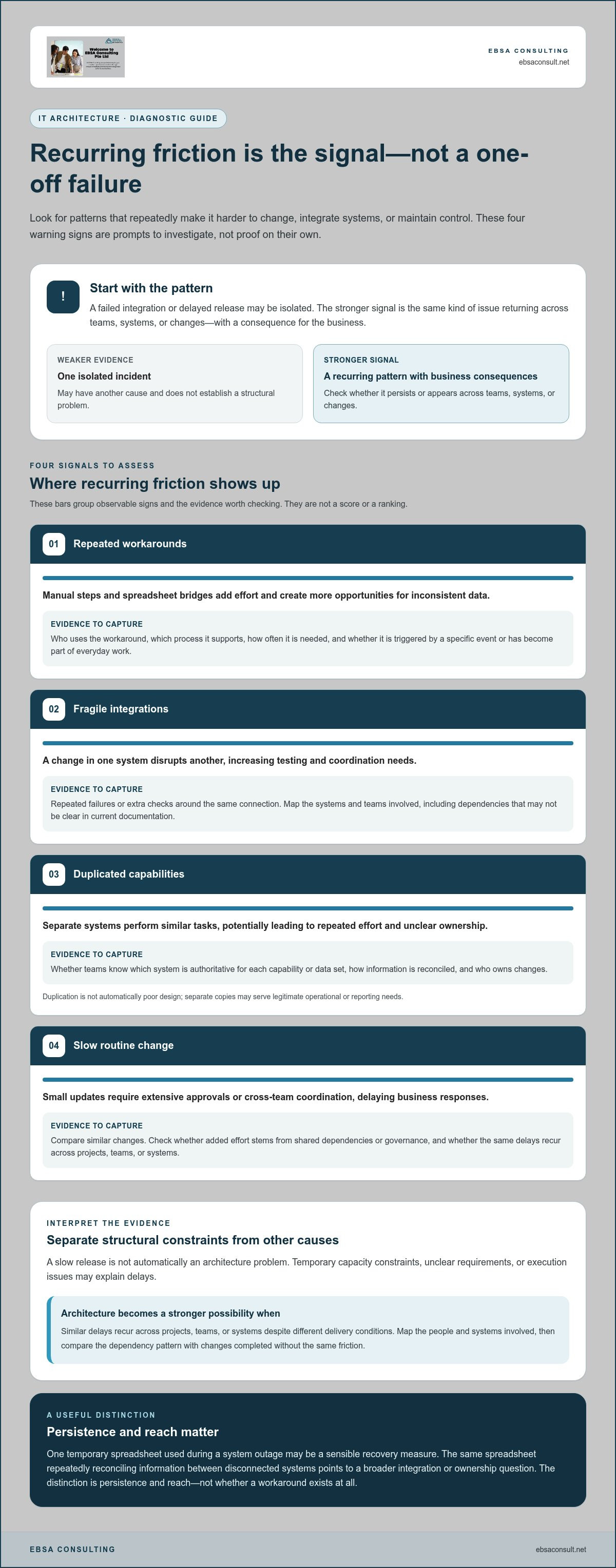
A failed integration or delayed release can be an isolated incident. The stronger signal is a pattern: the same kind of issue keeps returning across teams, systems, or changes. In this section, signs of a poor IT architecture means recurring structural obstacles that make it harder for an organisation to change, integrate systems, or maintain control.
IT architecture describes how technology components and their relationships support organisational needs. A useful starting point is this overview of Information technology architecture. In practice, warning signs may include:
- Repeated workarounds: Manual steps or spreadsheet bridges add effort and create more opportunities for inconsistent data. Track who uses them, which process they support, and how often they are needed.
- Fragile integrations: A change in one system disrupts another, increasing testing and coordination needs. Look for repeated failures or extra checks around the same connection.
- Duplicated capabilities: Separate systems perform similar tasks, which can lead to repeated effort and unclear ownership. Check whether teams know which system is authoritative for each capability or data set.
- Slow routine change: Small updates require extensive approvals or cross-team coordination, delaying business responses. Compare similar changes to see whether the added effort stems from shared dependencies or governance.
None of these signals proves an architecture is failing on its own. An architecture warning sign is a recurring pattern with business consequences, not a single isolated defect.
When recurring workarounds signal a structural problem
Manual handoffs, spreadsheet bridges, and repeated exceptions are useful evidence to investigate, especially when they span systems or persist across releases. Record how often each workaround occurs, which teams use it, and the business process it supports. Also note whether it is triggered by a specific event, such as a system outage, or forms part of everyday work. This helps reveal whether a local workaround is contained or has become a routine dependency that slows work and weakens process consistency.
For example, one temporary spreadsheet used during a system outage may be a sensible recovery measure. The same spreadsheet repeatedly reconciling information between disconnected systems points to a broader integration or ownership question. The distinction is persistence and reach, not whether a workaround exists at all.
When change and integration become consistently difficult
Routine changes can expose hidden dependencies: a small update may require extra testing, coordinated releases, or changes in systems that should be independent. Recurring integration failures can also indicate unclear data ownership or designs that don’t work well together. These patterns can delay delivery and make changes harder to control.
Check the cause before labelling the issue architectural. A temporary capacity constraint, unclear requirements, or an execution problem may explain a slow release. Architecture becomes a stronger possibility when similar delays recur across projects, teams, or systems despite different delivery conditions. Map the systems and teams involved, then compare the dependency pattern with changes that were completed without the same friction.
How Poor IT Architecture Creates Complexity, Risk, and Misalignment
Recurring technical friction can affect more than the teams closest to a system. As applications, data, and processes become more interdependent, even a contained change may call for broader coordination. The result can be slower delivery, less predictable effort, and fewer clear options for responding to business priorities.
Architectural complexity makes change slower and less predictable when dependencies are difficult to see or manage. That does not mean complexity guarantees failure. It does mean teams may need stronger evidence and control to understand the impact of a decision before acting.
How dependencies and duplication compound over time
Point-to-point connections can create hidden dependencies: one application may rely on another’s data format, timing, or behaviour without that relationship being clear in current documentation. As those connections accumulate, a change in one place may require teams to coordinate testing across several systems. This increases the effort needed to assess scope and can make release planning less certain. A dependency map can help show which systems, interfaces, and owners need to be considered before a change is approved.
Duplicated data or capabilities can add further complexity, but duplication isn’t automatically poor design. Separate copies may serve legitimate operational or reporting needs. The useful questions are whether teams understand which source is authoritative, how information is reconciled, and who owns changes. If those answers vary by system or team, decisions can become slower and inconsistencies harder to resolve.
Over time, repeated shortcuts can also create technical debt: choices that make immediate delivery easier but leave future changes more difficult. IBM’s discussion of Understanding Technical Debt in IT Architecture offers context for how such trade-offs can affect future work. The practical concern is not the label itself, but whether accumulated dependencies are constraining current priorities. Look at whether recurring maintenance, coordination, or testing effort is displacing planned improvements.
How misalignment affects strategy and control
When ownership is fragmented, technology decisions can optimise for individual systems or teams rather than shared business outcomes. For example, different groups may define the same data differently or apply inconsistent controls because responsibilities and standards are unclear. These conditions can create governance and decision-making risks, but they aren’t proof that a control has failed or that an incident has occurred. Review the relevant ownership, system behaviours, and operational evidence before drawing that conclusion.
An enterprise architecture perspective can help connect those local decisions to broader capabilities, priorities, and constraints. It provides a way to examine where technology choices support the organisation’s direction and where dependencies or inconsistent standards warrant attention. If this assessment points to cross-system misalignment, enterprise architecture consulting can help structure the discussion around business objectives and architectural choices.
A Checklist for Assessing IT Architecture Warning Signs
Use evidence to determine whether a recurring problem points to architecture, implementation, or a temporary constraint. This five-step assessment helps teams compare concerns consistently without relying on a universal benchmark that may not fit their operating context.
- Define the scope. Choose the business process, systems, or change area you want to assess, and set a clear period for review.
- Collect evidence. Review architecture diagrams, change records, incident patterns, integration maps, and feedback from affected teams. Include the people who own the process and the systems involved.
- Identify recurring patterns. Look for dependencies, duplicated capabilities, unclear ownership, or similar delays across initiatives. Note where the pattern repeats and where it does not.
- Assess business impact. Record the effect on delivery, operational control, service continuity, or progress towards business priorities. Describe the consequence in terms the affected teams can verify.
- Prioritize findings. Compare recurrence, impact, breadth, and confidence in the evidence before deciding what needs attention first.
The signs of a poor IT architecture become more meaningful when teams can connect a visible symptom to evidence and a consequence. A concern seen in one system, supported by anecdotal feedback, should carry less confidence than a repeated pattern documented across several initiatives.
What evidence helps validate an architecture concern?
Compare planned and actual change effort across representative initiatives where records are available. Map application dependencies, integration flows, duplicated data or capabilities, and ownership boundaries. Then speak with business and technology teams to test whether they experience the same friction and how it affects the process. Agreement across perspectives strengthens the case; conflicting accounts identify questions to investigate. Keep evidence separate from interpretation so that teams can see which conclusions are well supported and which need further review.
Capture each finding in a simple assessment record. For example:
| Observed symptom | Evidence to review | Business impact | Confidence |
|---|---|---|---|
| Changes regularly require cross-system testing | Change records and dependency maps | Less predictable delivery | High if repeated across initiatives |
| Teams reconcile different data versions | Integration flows and team feedback | Extra coordination and decision delays | Medium until ownership is validated |
How to prioritize symptoms without overreacting
Rank findings by business criticality, recurrence, scope, and potential risk. Treat an immediate, evidenced exposure differently from an improvement opportunity that can be sequenced over time. Compare trends within your own organisation, state the assumptions behind each assessment, and revisit confidence as new evidence emerges. For a broader view of aligning technology decisions with organisational priorities, see this enterprise architecture consulting guide.
A useful priority is not simply the most visible technical issue. It is the concern with the clearest evidence, the widest relevant impact, and the strongest connection to business objectives. If two findings appear equally important, consider which one blocks more work or creates dependencies for other improvements.
What to Do if Your IT Architecture Checklist Finds Problems
A checklist is a starting point, not a mandate for a major rebuild. Before choosing a remedy, validate the cause with the people accountable for the affected business processes and systems. Compare their experience with change records, dependency maps, and operational evidence. A delivery delay, for example, may stem from an architectural dependency, but it could also reflect unclear requirements or limited capacity.
Once the cause is better understood, group findings by scope:
- Local fixes: Address a contained issue within one system or team, such as clarifying an interface or removing an unnecessary manual step.
- Shared design changes: Coordinate a change across systems when dependencies, data definitions, or integration patterns affect more than one team.
- Strategic architecture decisions: Consider broader direction when validated patterns cross business capabilities, systems, or decision boundaries.
Choose the smallest scope that resolves the underlying issue without creating new constraints. The right response depends on evidence, business priorities, and architectural dependencies, not on the number of symptoms alone. Before implementation, make the intended outcome and the systems or teams affected explicit so the proposed change can be assessed against the original problem.
Choose between targeted remediation and broader redesign
A contained issue with a clear owner and limited dependencies may be addressed through targeted remediation. Broader redesign deserves consideration when the same constraint appears across several systems or capabilities, or when teams cannot resolve it through local decisions. Neither option is automatically preferable. Weigh business impact, risk, delivery capacity, and the consequences of leaving the pattern in place.
Sequence the work rather than treating every finding as equally urgent. Address material exposure and high-impact dependencies first, then schedule improvements that can be delivered incrementally. Avoid prescribing a full rebuild before the evidence shows that narrower interventions won’t address the root cause. When a broader change is justified, define what will remain stable during the transition and how teams will manage dependencies along the way.
Build a sequenced improvement roadmap
For each priority, define the intended business outcome, an accountable owner, key dependencies, and the decision points that will guide delivery. Connect solution-level changes to enterprise-wide principles so teams can make local progress without creating conflicting designs. A clear solution architecture design process can help structure that alignment.
Set a baseline before work begins, using indicators relevant to the problem, such as change effort, integration issues, or coordination steps. Review them at agreed intervals and compare trends against the baseline. If friction isn’t reducing, revisit the root-cause assumptions and adjust the roadmap.
For a structured view of validated issues and possible next steps, explore strategic architecture consulting focused on aligning technology decisions with business priorities.
How Architecture Consulting Turns Warning Signs into a Coherent Plan
Identifying the signs of a poor IT architecture is only useful if the findings lead to decisions that fit the business. Architecture consulting can help teams move from validated symptoms to a shared view of what matters, where constraints sit, and which choices deserve attention. The aim isn’t to prescribe a rebuild, but to create a coherent direction grounded in business objectives, capabilities, processes, systems, and delivery constraints.
That work depends on collaboration. Business and technology stakeholders bring different evidence: process owners understand where work is obstructed, while system teams can explain dependencies and design trade-offs. Connecting those perspectives helps distinguish local implementation concerns from patterns that need broader architectural consideration.
Connect business priorities with technology decisions
Business architecture clarifies the capabilities and operating priorities behind a technical symptom. If a process depends on repeated manual reconciliation, for example, the discussion should include the business outcome that process supports, not only the systems involved. Enterprise architecture then places the issue within the wider technology landscape, helping teams consider shared capabilities, dependencies, and strategic direction.
This alignment supports more consistent decisions while leaving room to account for organisational context and constraints. For a deeper explanation of how business architecture supports enterprise alignment, read the business architecture services guide.
Move from diagnosis to architecture decisions
Once the business context and architectural patterns are understood, solution architecture translates requirements and constraints into considered technical designs. Teams can compare options, make trade-offs explicit, and assess how each choice supports business objectives and fits the wider architecture. Shared decision-making matters: business stakeholders, architects, and system teams should understand both the rationale and the implications of the selected direction.
Enterprise, business, and solution architecture each address a different layer of the challenge. Together, they can help organise findings into a practical set of decisions without assuming every concern will have the same remedy. EBSA Consulting brings these perspectives to architecture alignment, connecting technology choices with business objectives.
A useful next step is to clarify which priorities matter most, what evidence supports them, and what improvement scope is appropriate. Discuss your architecture priorities with EBSA Consulting to explore a considered path forward.
Turn Architecture Findings into Forward Momentum
The most useful signs of a poor IT architecture are recurring patterns with evidence and business consequences, not isolated technical issues. Reviewing their frequency, scope, and impact helps teams distinguish structural constraints from implementation or capacity challenges.
Once concerns are validated, match the response to the problem. Some findings call for a targeted adjustment; others may require shared design changes or broader strategic decisions. A clear baseline and agreed indicators make it easier to track whether friction is easing as improvements progress.
EBSA Consulting brings enterprise, business, and solution architecture perspectives together to align technology decisions with business objectives. This structured, collaborative approach can help clarify priorities and shape a practical direction without assuming every challenge calls for a major transformation.
Discuss your architecture priorities with EBSA Consulting and take a considered next step towards a more adaptable technology environment. With clear evidence and aligned decisions, your organisation can move forward with greater confidence.
Frequently Asked Questions
What are the most common signs of a poor IT architecture?
The most common signs of a poor IT architecture are recurring workarounds, fragile integrations, duplicated capabilities, slow or risky changes, and unclear system ownership. Each is a signal to investigate, not conclusive proof on its own. A single integration failure may have a local cause; similar friction recurring across systems, teams, or releases carries more diagnostic weight. Record where it happens, how often it happens, and which business process it affects.
How can I tell whether a problem is caused by IT architecture or poor implementation?
Compare how often the problem occurs, how widely it affects systems or teams, which dependencies are involved, and who owns the affected components. A defect limited to one implementation may not indicate a structural weakness. Similar friction across different initiatives can suggest an architectural cause. Review change records and system relationships with the teams involved, while keeping the distinction open to evidence rather than treating it as absolute.
Can poor IT architecture increase operational risk?
Yes, architectural patterns can make changes and oversight more difficult. Tightly coupled dependencies may broaden the impact of a change, while fragmented data or unclear controls can complicate coordination and visibility. These patterns don’t automatically cause an incident. Assess the specific exposure, the business criticality of affected processes, and the safeguards already in place before assigning severity or deciding what needs attention first.
How do you assess IT architecture without starting a full redesign?
Start with a proportionate review: define the scope, gather architecture and delivery evidence, identify recurring patterns, assess business impact, and prioritize findings. Review diagrams, change records, integration dependencies, incidents, and team feedback relevant to the area. The assessment can support a targeted improvement when the issue is contained, or inform broader change if evidence points to cross-system constraints. A redesign isn’t the default response.
What should an IT architecture assessment checklist include?
Include recurring workarounds, change effort, integration dependencies, duplicated capabilities, ownership, governance, and alignment with business priorities. For each finding, record supporting evidence, affected processes or systems, recurrence, business impact, and confidence in the assessment. Compare trends within your organisation rather than applying unsupported universal thresholds. This creates a more useful basis for judging which concerns are persistent, consequential, and ready for action.
When should a company consider changing its IT architecture?
Consider architectural change when persistent, validated patterns are affecting important business outcomes and narrower fixes aren’t addressing their causes. A contained issue with limited dependencies may suit targeted remediation; concerns spanning systems, capabilities, or decision boundaries may need broader planning. Set the timing and scope according to business priorities, architectural dependencies, delivery capacity, and risk. The evidence should guide the scale of change, not assumptions that every problem requires redesign.
Who should be involved in an IT architecture review?
Involve business leaders, technology leaders, architects, and the teams accountable for affected processes and systems. Business stakeholders can explain how friction affects priorities and operations, while technology teams can clarify system dependencies, design choices, and constraints. Bringing these perspectives together helps test whether a symptom is isolated or shared and connects findings to business outcomes. The right participants depend on the systems and processes within the review’s scope.


