

The most capable enterprise architecture platform can still be the wrong choice. A polished demonstration may showcase an impressive feature set, but it won’t show whether the tool fits your architecture workflows, governance model, or capacity to support adoption. Effective ea tool selection consulting starts with those realities, not a vendor’s presentation.
When stakeholders have different priorities or aren’t aligned on requirements and ownership, comparing platforms can quickly become difficult. A feature-led evaluation may add confusion instead of clarifying which option will support your organisation’s goals. Make decision criteria explicit and connect them to business and architecture outcomes.
This guide explains how to build a defensible shortlist for 2026 by assessing your practice’s maturity, defining priority use cases, and comparing capabilities against consistent criteria. You’ll also learn how to consider governance, integrations, access and pricing models, and implementation realities without mistaking feature volume for fit. The result is a documented decision and a practical adoption path based on how your organisation needs architecture to work.
Key Takeaways
- Start with the architecture practice and business outcomes the tool needs to support, then translate them into clear requirements.
- Map users and priority use cases to distinguish essential capabilities from preferences and future needs.
- Use an agreed, weighted evaluation to compare shortlisted platforms across modelling, governance, reporting, integration, and usability.
- Include ownership, data stewardship, operating effort, and change readiness in your decision, then plan a focused rollout around priority use cases.
- ea tool selection consulting can help teams structure requirements, run a consistent evaluation, and document decision rationale and adoption considerations.
EA Tool Selection Consulting: Start with the Architecture Practice, Not the Platform
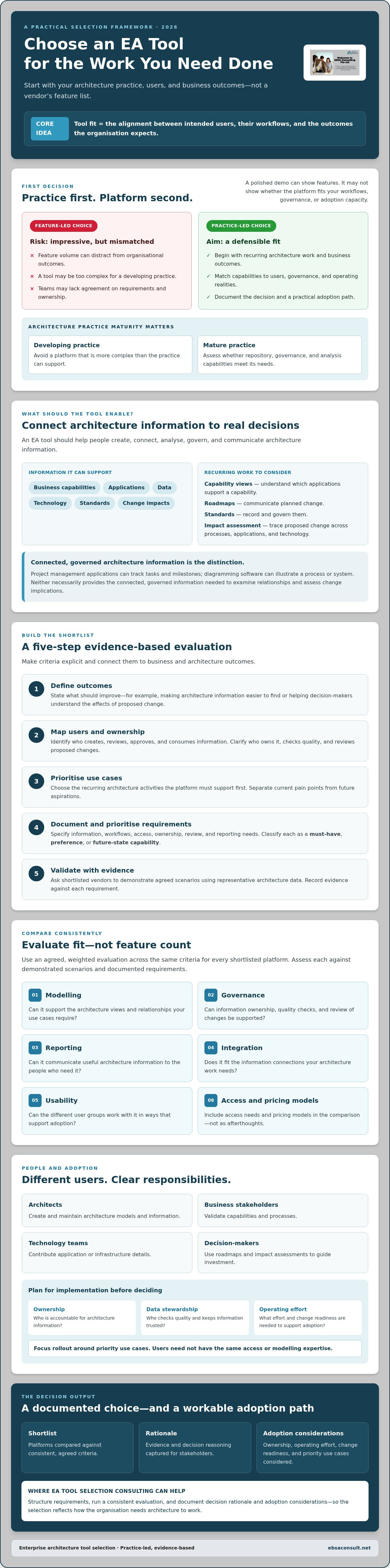
An enterprise architecture (EA) tool should help people create, connect, analyse, govern, and communicate architecture information. It can support views of business capabilities, applications, data, technology, standards, and change impacts. For a foundational overview of the discipline and its business, data, application, and technology domains, see Enterprise architecture.
The sequence matters. Choosing a platform before deciding how architecture work gets done can lead to a mismatch. The tool may be too complex for a developing practice, or lack the repository, governance, and analysis capabilities a mature practice needs. A project management application can track tasks and milestones, while diagramming software can illustrate a process or system. Neither necessarily provides the connected, governed architecture information needed to examine relationships and assess the implications of change.
Tool fit is the alignment between intended users, the workflows they need to support, and the outcomes the organisation expects from its architecture practice. This is the starting point for ea tool selection consulting: define the work the platform must enable before comparing products.
Which architecture work should the tool support?
Begin with recurring decisions and activities, not a catalogue of features. Consider whether teams need to maintain capability views, develop roadmaps, record standards, or assess the impact of a proposed change across processes, applications, and technology. For each activity, identify what is difficult today and describe what a better outcome would look like. For example, if teams cannot tell which applications support a capability, define the information and relationships they need to see.
Separate current pain points from future aspirations. If teams struggle to find reliable application ownership information, that is a present need. Advanced analytics may be valuable later, but shouldn’t outweigh the ability to establish trusted data and useful views now. Business architecture and solution architecture needs may intersect: a business capability change can shape solution requirements, while a solution design can reveal impacts on processes, information, or standards. The right platform should support the connections your practice actually needs.
Who needs to use and govern the platform?
Map the people who create, review, approve, and consume architecture information. Architects may maintain models; business stakeholders may validate capabilities and processes; technology teams may contribute application or infrastructure details; decision-makers may use roadmaps and impact assessments to guide investment. These roles don’t all need the same access or modelling expertise.
Clarify who owns information, who checks its quality, and how proposed changes are reviewed. Without this agreement, even a capable platform can become a repository people don’t trust or update. For broader context on aligning architecture practice with organisational direction, see Strategic Architectural Frameworks Consulting: The 2026 Enterprise Guide.
Build EA Tool Requirements Around Use Cases, Governance, and Adoption
Turn your defined architecture practice into requirements that vendors can demonstrate and stakeholders can assess. A disciplined process keeps the evaluation focused on organisational outcomes rather than an expanding wish list.
- Define outcomes. State what should improve, such as making architecture information easier to find or helping decision-makers understand the effects of a proposed change.
- Map users. Identify who creates, reviews, approves, and consumes information, including architects, business stakeholders, technology teams, and decision-makers.
- Prioritise use cases. Select the recurring architecture activities the platform must support first, then distinguish them from possible later applications.
- Document requirements. Specify information, workflows, access, ownership, review, and reporting needs. Mark each as a must-have, preference, or future-state capability.
- Validate fit. Ask shortlisted vendors to demonstrate agreed scenarios using representative architecture data, and record evidence against each requirement.
A requirement describes an outcome the practice must achieve; a feature preference describes one possible way to achieve it. For example, “trace an application change to affected capabilities and processes” is testable. “Include a particular visual dashboard” may simply be a preference unless that view is essential to a decision.
Translate architecture use cases into testable requirements
For impact analysis, define a scenario: a proposed application change is entered, and users need to identify connected capabilities, processes, or other architecture information for review. Agree what traceability should be visible, who owns the underlying records, which users can access them, and how findings are reviewed.
Apply the same discipline to information modelling, repository management, workflow, reporting, and integrations. Don’t assume every platform supports your needs in the same way. Test usability and report quality with representative data, not just a vendor’s prepared demonstration. External research, such as the Gartner Magic Quadrant, can inform market research, but it doesn’t replace checking how a platform performs against your own requirements.
Check readiness before comparing platforms
Before evaluating products, confirm who holds architecture responsibilities, who makes decisions, and how information is maintained today. An enterprise architecture maturity assessment can help surface gaps in governance, skills, data ownership, or repeatable practice that a tool alone won’t resolve. For more maturity context, consult Enterprise Architecture Maturity Assessment: The 2026 Strategic Guide.
Clear requirements and readiness priorities give teams a stronger basis for comparing options. If you need support aligning architecture needs with business priorities, explore enterprise architecture consulting as a decision-support option.
Compare EA Tools with a Consistent, Evidence-Based Evaluation
Once requirements are agreed, compare each shortlisted platform against the same criteria and workflows. A weighted matrix keeps the discussion anchored to organisational priorities rather than the length of a vendor’s feature list. Before demonstrations begin, decide what evidence will count, who will assess each criterion, and how much each criterion matters to the intended outcomes.
Assess the areas relevant to your practice: information modelling, repository management, collaboration, governance workflows, reporting, integrations, and usability. Assign priority weights based on business and architecture needs, then apply the same scoring scale to every option. A capability essential to maintaining trusted architecture information should carry more weight than a preference that would be useful but isn’t required for the initial use cases.
A feature-rich platform doesn’t automatically produce better architecture outcomes. If people can’t maintain its information, workflows don’t reflect decision rights, or reports don’t inform real decisions, extensive functionality may add complexity without improving the practice. A useful comparison shows not only what a tool can do, but how well it supports your agreed work.
What should an EA tool comparison matrix include?
For each criterion, record its priority, the evidence required, the person responsible for evaluation, and the score. Define scoring guidance in advance. For example, specify whether a capability must be demonstrated in the platform, supported by documentation, or confirmed through further verification. This reduces the risk of stakeholders interpreting vendor claims differently.
Ask every shortlisted vendor to complete identical workflows. For example, have users update a capability or application record, submit it for review, and produce a view that helps a decision-maker understand its status. Alongside scores, capture constraints, dependencies, unanswered questions, and confidence in the evidence. Treat a high score based on an unverified assumption differently from one supported by a successful demonstration.
How can teams test fit beyond vendor demonstrations?
Prepare scenarios using representative architecture information and the roles expected to work with it. Test specialist tasks, such as maintaining relationships between records, and business-user tasks, such as finding a clear view of ownership or change status. Notice where users need guidance, encounter unnecessary steps, or struggle to interpret results.
Keep a verification log for questions that a demonstration can’t settle. Confirm relevant security controls, integration options, data migration requirements, and administration responsibilities against current platform documentation and your organisation’s needs. This evidence-based approach is central to ea tool selection consulting: it turns vendor presentations into a consistent assessment stakeholders can review and defend.
Plan Implementation, Governance, and Adoption Before You Decide
A platform decision also commits the organisation to new operating work. Assess the effort needed to configure and administer the tool, maintain its information, manage access, and support users. Clarify who owns repository quality and data stewardship, who oversees governance, and whether teams have the capacity and readiness to adopt new workflows. These responsibilities should shape selection criteria, not be left until after a contract is signed.
Establish a baseline before setting expectations for improvement. Review how architecture information is created, maintained, and used in decisions today. The Enterprise Architecture Health Check: A Practical Assessment Template for 2026 can provide useful context for identifying areas to examine. Use what you learn to define success measures tied to actual architecture work, such as whether information is kept current or whether decision-makers can use architecture views in reviews. Set measures that fit your baseline rather than assuming unsupported target benchmarks.
What should a realistic EA tool implementation plan cover?
Plan a sequence that lets the organisation learn and adjust: configure the agreed workflows, prepare and migrate priority information, verify required integrations, pilot representative use cases, and gather user feedback before expanding. Identify dependencies early, including data readiness, access decisions, integration prerequisites, and the availability of people responsible for ongoing administration. Verify assumptions with the relevant owners and platform documentation before committing to a rollout plan.
Assign accountable owners for repository quality, information access, governance decisions, and administration. A tool can support these responsibilities, but it can’t resolve unclear ownership by itself. Include the time and effort required to keep information useful as part of the decision.
How can adoption become part of tool selection?
Bring representative users into requirements discussions, scenario testing, and decision reviews. Architects, business stakeholders, and technology teams may approach the same information differently; their input can reveal where workflows need refinement. Plan role-based guidance around real tasks, such as reviewing a capability view or contributing information to an architecture decision, rather than relying on generic platform orientation.
Start with a proportionate rollout focused on prioritised use cases. Track agreed indicators, such as participation in the pilot, information quality, completion of review workflows, or use of architecture information in decisions. Use feedback to decide what to refine before broadening adoption. A structured approach to ea tool selection consulting can help connect tool fit with governance and readiness. To align implementation decisions with business and technology priorities, explore enterprise architecture consulting support.
When EA Tool Selection Consulting Adds Value, and What to Expect
Internal teams may be well placed to choose a platform, particularly when requirements are clear, stakeholders agree on priorities, and the organisation can run a consistent evaluation. Outside support can add value when those conditions aren’t in place: teams interpret needs differently, vendor demonstrations are difficult to compare, or there’s limited architecture expertise available to assess how a tool fits existing workflows.
Effective ea tool selection consulting supports the decision process without taking ownership away from the organisation. Depending on the agreed scope, useful outputs may include documented requirements, an evaluation approach, evidence from platform assessments, a decision rationale, and adoption considerations. These give stakeholders a shared basis for discussion and a record of why an option was selected. They don’t replace internal accountability for the final decision or ongoing tool ownership.
How do you assess whether selection consulting is the right fit?
Before engaging an advisor, clarify the expected scope, responsibilities, assumptions, and decision checkpoints. Ask how they’ll understand your business context, involve stakeholders, handle conflicting priorities, and distinguish demonstrated capabilities from vendor claims. Explore how they maintain neutrality, including whether any commercial relationships could influence their recommendations. The advisor should help your organisation make an informed choice, not steer it toward a predetermined platform.
Keep decision rights explicit. Your organisation defines its needs, validates evidence, chooses the platform, and assigns ongoing ownership. An advisor can facilitate alignment and bring structured evaluation or architecture expertise, while the internal team remains accountable for the decision and its consequences.
How can an architecture advisor support a sound decision?
An advisor with enterprise, business, and solution architecture experience can help connect tool requirements to strategic priorities, governance needs, and the way architecture information will be used. EBSA Consulting provides these architecture services, with a focus on aligning business strategy and technology. Its role in this context is decision support, not the sale of a software product. Discuss the proposed scope and outputs directly rather than assuming a particular methodology or deliverable.
Useful questions for a prospective advisor include:
- How will you understand our architecture practice and business priorities?
- How will you make platform evidence comparable and document unresolved questions?
- How will you involve stakeholders while keeping decision authority with our organisation?
- What assumptions, responsibilities, and checkpoints should we agree before work begins?
If requirements, stakeholder alignment, or evaluation evidence are making the decision difficult, discuss an EA tool selection challenge with EBSA Consulting. A well-scoped conversation can help clarify the decision support your organisation needs to move forward with confidence.
Make Your EA Tool Decision Work for the Long Term
A sound EA tool decision starts with the architecture practice it needs to support. Define outcomes and users first, then compare shortlisted platforms against consistent evidence rather than feature volume. Assess governance, ownership, operating effort, and adoption before committing to a rollout.
This structure helps stakeholders reach a decision they can explain and act on. ea tool selection consulting can provide decision support when requirements are difficult to align or evaluation evidence is hard to assess. The aim isn’t to choose the most feature-rich platform; it’s to identify an option that fits your business priorities and can be sustained in practice.
EBSA Consulting provides enterprise architecture consulting focused on aligning business strategy with technology, alongside business architecture services and solution architecture design. If you’re shaping requirements or working through a shortlist, discuss your EA tool selection needs with EBSA Consulting.
A clear, collaborative process can turn a complex choice into a practical next step for your architecture practice.
Frequently Asked Questions
What does EA tool selection consulting include?
EA tool selection consulting helps an organisation structure requirements, assess platform fit, and document a defensible decision. It can include clarifying architecture use cases, mapping stakeholders, setting evaluation criteria, comparing evidence from vendor scenarios, and identifying adoption considerations. Agree the scope in advance, including responsibilities and decision checkpoints. Consulting supports the organisation’s choice; it doesn’t mean the advisor sells a particular software product or takes ownership of the final decision.
How do you choose an enterprise architecture tool?
Choose an enterprise architecture tool by first defining the work it needs to support and the outcomes your organisation expects. Identify intended users, prioritise use cases, and turn them into testable requirements. Then compare shortlisted tools against those criteria using consistent scenarios and evidence. Consider capabilities, governance, data ownership, integration needs, operating effort, and user readiness. Select the option that fits the practice you can sustain.
Which capabilities should an EA tool have?
An EA tool should have the capabilities required by your architecture use cases, rather than a universal checklist. Depending on your needs, assess information modelling, repository management, traceability, collaboration, governance workflows, reporting, integrations, and usability. For example, a team conducting impact analysis may need to trace relationships among business capabilities, processes, applications, and technology. Confirm that each shortlisted platform supports your scenarios, and verify capabilities against current product documentation.
How can we compare enterprise architecture tools fairly?
Agree on criteria, priority weights, evidence standards, and evaluation owners before vendor demonstrations. Ask each provider to show the same realistic workflows, using comparable architecture information and user roles. Score demonstrated capabilities consistently, and record constraints, dependencies, unanswered questions, and confidence in the evidence. Treat roadmap statements and assumptions as unverified, not as current functionality. A structured comparison helps stakeholders assess fit without letting feature volume dominate the decision.
When should an organization hire an EA tool selection consultant?
Consider an EA tool selection consultant when stakeholders disagree about requirements, internal teams lack capacity to run a structured evaluation, or vendor claims are difficult to assess against architecture needs. An advisor can facilitate alignment, bring architecture expertise, and make comparisons more consistent. Clarify the scope, responsibilities, assumptions, and decision checkpoints before starting. The organisation should retain ownership of the platform and remain accountable for the final selection.
Can an EA tool improve architecture governance and adoption?
An EA tool can support governance and adoption by making architecture information easier to maintain, review, share, and use in decisions. It may provide workflows for reviews, access to relevant views, and clearer connections between architecture records. But technology alone won’t establish decision rights, assign data owners, or build user confidence. Define governance responsibilities and involve intended users in testing, then track agreed indicators such as information quality and use in decision processes.
What should an enterprise architecture tool evaluation include?
An enterprise architecture tool evaluation should include agreed requirements, priority use cases, consistent comparison criteria, and evidence from realistic scenarios. Assess modelling, repository, collaboration, governance, reporting, integration, and usability needs where relevant. Also examine operating effort, ownership, data stewardship, security questions, migration considerations, and adoption readiness. EBSA Consulting provides enterprise architecture consulting, business architecture services, and solution architecture design to align architecture approaches with business and technology priorities.


